Once you've worked with spreadsheets for a while, GRC software tools start to look a lot more appealing, because they take the repetitive parts of tracking risks, controls, and policies and put them in one connected system instead of a dozen disconnected files. This guide won't rank specific named products or quote pricing, since that information changes constantly and varies by contract — instead, it breaks down the categories of GRC software tools so you understand what each type actually does.
What Is GRC Software Used For?
What is GRC software used for, in practical terms? It centralizes the work that used to live in scattered spreadsheets: tracking risks in a risk register, mapping controls to the frameworks they satisfy, scheduling control testing, storing policy documents with version history, and managing audit findings through to remediation. The specific feature set varies a lot by vendor and product tier, so it's worth treating any vendor's feature claims as something to verify yourself during a trial, rather than something to take purely on faith from a sales page.
Category One: All-in-One GRC Platforms
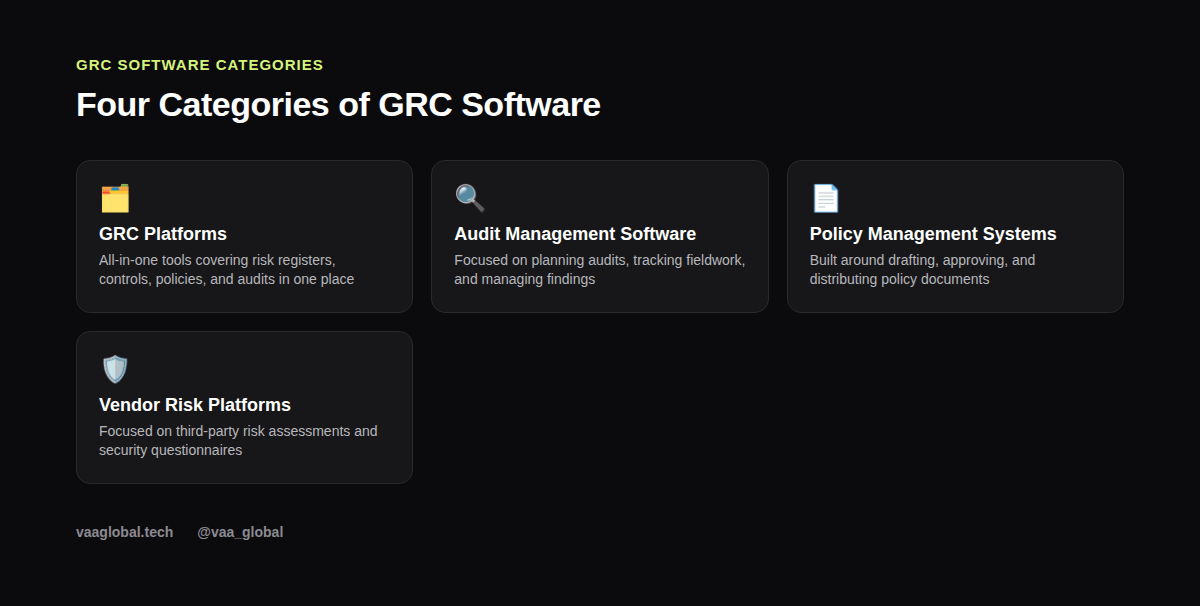
A full GRC platform tries to cover the whole lifecycle in one system — risk register, controls, policies, audits, and often vendor risk too. The appeal is having one source of truth instead of five disconnected tools. The tradeoff is that an all-in-one platform can feel like overkill for a small team only tracking one or two compliance frameworks, and the learning curve to configure it properly can be steep.
Category Two: Audit Management Software
Audit management software focuses specifically on the audit management software workflow: planning audits, assigning fieldwork, collecting evidence, and tracking findings through remediation. Teams that run frequent internal audits — especially larger internal audit functions — often get more value from a dedicated audit tool than trying to force a general GRC platform to handle audit-specific workflows well.
Category Three: Policy Management Systems
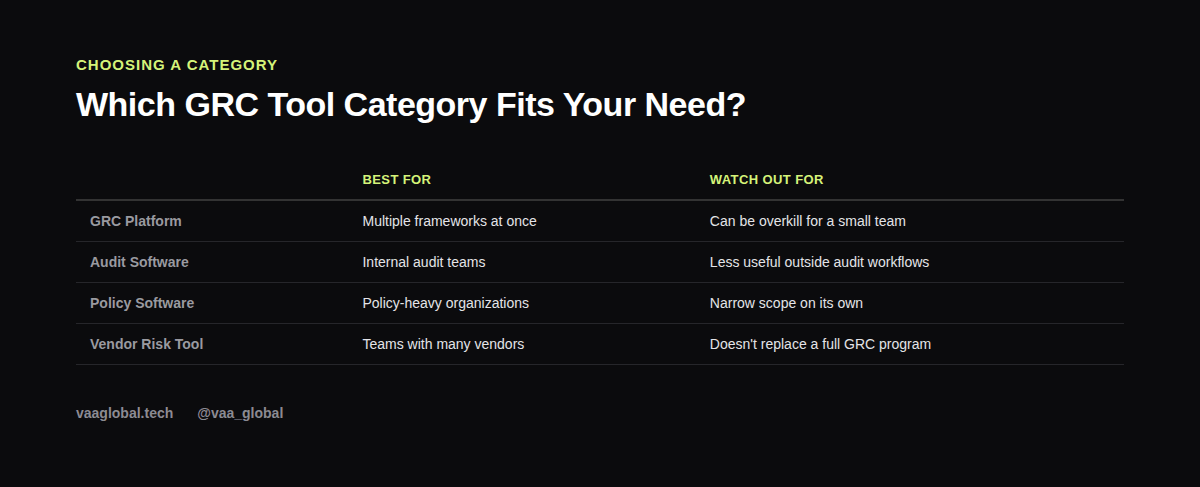
A policy management system is built around the policy lifecycle itself: drafting, routing for approval, publishing, tracking acknowledgments from staff, and flagging when a policy is due for review. Organizations with a lot of policies across multiple departments — common once a company passes a few hundred employees — tend to benefit most from a dedicated tool here, rather than managing policy approvals over email.
Category Four: Vendor Risk Management Tools
A vendor risk management tool centers on assessing and monitoring third parties — collecting security questionnaires, tracking vendor certifications, and flagging vendors whose risk profile has changed. Companies with dozens or hundreds of vendors often find this category pays for itself quickly, since manually chasing vendor questionnaires by email doesn't scale well past a handful of relationships.
Do Small Companies Need GRC Software?
Do small companies need GRC software, or can spreadsheets still work? Honestly, spreadsheets can absolutely work at small scale — a handful of risks, a handful of controls, one compliance framework. The difference between GRC software and spreadsheets becomes obvious once the number of controls, frameworks, or vendors grows past what one person can track reliably in their head and a few tabs. There's no fixed headcount where this switch becomes necessary; it's more about complexity than company size alone.
How Do You Choose GRC Software?
How do you choose GRC software once you've decided you need it? Start with your actual requirements, not a vendor's feature list: which frameworks do you need to track, how many people need access, do you need integrations with your existing IT systems, and what's your realistic budget. Ask for a trial or sandbox environment before committing, and talk to current customers if the vendor will connect you. Because feature sets and pricing change frequently, it's far more reliable to verify current capabilities directly with a vendor than to rely on an old comparison article, including this one.
A Worked Example: Evaluating Two Shortlisted Tools
A practical evaluation checklist might look like this, scored on a simple 1-5 scale per tool: does it support our specific compliance framework out of the box, how steep is the setup and configuration curve, can it integrate with our HR and IT systems for automated evidence collection, what does onboarding and ongoing support actually look like, and how transparent is the vendor about pricing at our expected usage level. Scoring two or three shortlisted tools side by side on these criteria, based on your own trial experience, beats trusting a generic "best GRC tools" ranking you find online. This same habit of comparing options against your real requirements, rather than a popularity list, is one reason business analysis and data analysis both lean so heavily on structured comparison skills.
GRC Software and Your Career
Getting hands-on with any GRC platform — even a free trial or a demo environment — is a genuinely useful thing to put on a resume for GRC analyst roles, similar to how writing a cybersecurity resume with no experience recommends showcasing hands-on practice over credentials alone, since most employers use some form of dedicated tooling rather than pure spreadsheets. If you're building toward this kind of role, best tools for business analysts covers a related set of software skills worth having, and common cybersecurity tools beginners should learn overlaps with the technical side of many GRC platforms. The AICPA also publishes resources on how technology supports compliance work if you want to go deeper on the audit-automation side specifically.
The Bottom Line
There's no single best GRC software tool — the right choice depends entirely on your frameworks, team size, and budget. Understanding the categories — GRC platforms, audit management software, policy management systems, and vendor risk tools — gives you a much clearer starting point than chasing a ranked list, and that clarity is worth more than any specific feature comparison this article could offer.