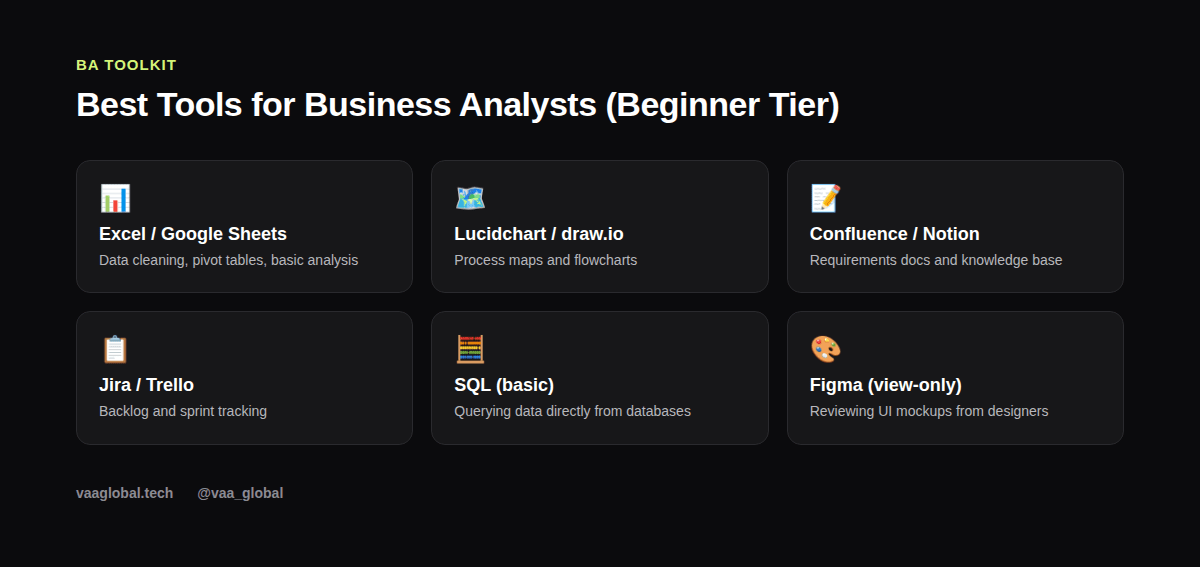
Figuring out the best tools for business analysts as a beginner can feel overwhelming, because job postings often list five or six software names you've never touched. The good news is that you don't need to master all of them at once. Most entry-level BA roles really only expect you to be comfortable with a spreadsheet tool, a process-mapping tool, a documentation tool, and a project-tracking tool — the rest you pick up on the job.
Why Tool Choice Matters Less Than You Think
Many beginners assume they need to learn the exact software stack listed in a job ad before applying. However, most companies care more about whether you understand the underlying skill — process mapping, requirements documentation, data analysis — than the specific brand of software. Because most BA tools in each category work similarly, once you've learned one spreadsheet tool or one diagramming tool well, switching to a different one at a new job takes days, not months.
Spreadsheets: Excel and Google Sheets
Spreadsheet skills remain the single most requested BA tool skill, and for good reason: most requirements tracking, data cleaning, and basic analysis still happens in a spreadsheet. As a beginner, focus on pivot tables, VLOOKUP or XLOOKUP, conditional formatting, and basic charting. You don't need to be a data analyst-level power user, but you should be able to clean a messy dataset and summarize it without help. If spreadsheet work interests you more broadly, our article on business analysis vs data analysis explains where the two roles diverge.
Process Mapping: Lucidchart and draw.io
Process maps are how BAs visually communicate a workflow without a thousand-word document. Lucidchart is popular in professional settings, but draw.io (now diagrams.net) is free and just as capable for practice. Learn the basic flowchart symbols — process, decision, start/end — and practice mapping something you already know well, like your own morning routine or a process at a part-time job. This builds the exact instinct you'll need later for mapping a real business process.
Documentation: Confluence and Notion
Every BRD, meeting note, and process map eventually needs a home where the whole team can find it. Confluence is the enterprise standard, but Notion is a close, often friendlier alternative for practicing on your own. Our guide on how to use Notion to organize remote work is a useful starting point even though it's written from a general productivity angle rather than BA-specific.
Backlog and Sprint Tracking: Jira and Trello
Since most product teams work in agile sprints, understanding backlog tools matters even for entry-level BAs. Jira is the industry standard for larger companies, while Trello's simpler card-based board is a gentler way to learn the same core concepts: backlogs, sprints, and status tracking. Create a free account and simulate a two-week sprint for a personal project just to get the muscle memory down.
Beyond the Basics: SQL and Data Analysis
Basic SQL is increasingly listed in BA job postings, mainly because it lets you pull data directly instead of waiting on a data team. You don't need advanced query skills; learning SELECT, WHERE, JOIN, and GROUP BY covers most real BA use cases. For context on how deep this rabbit hole can go compared to a dedicated data role, see our breakdown of business analysis vs data analysis again, since the line between the two often comes down to exactly this skill.
Should Beginners Learn Figma or UI Tools?
Some BA roles, especially product-adjacent ones, expect you to read and comment on UI mockups even if you never design them yourself. A free Figma account lets you practice viewing and leaving comments on a design file, which is often all a BA actually needs to do. This is a lighter lift than it sounds — you're reviewing, not designing.
How to Practice These Tools Without a Job
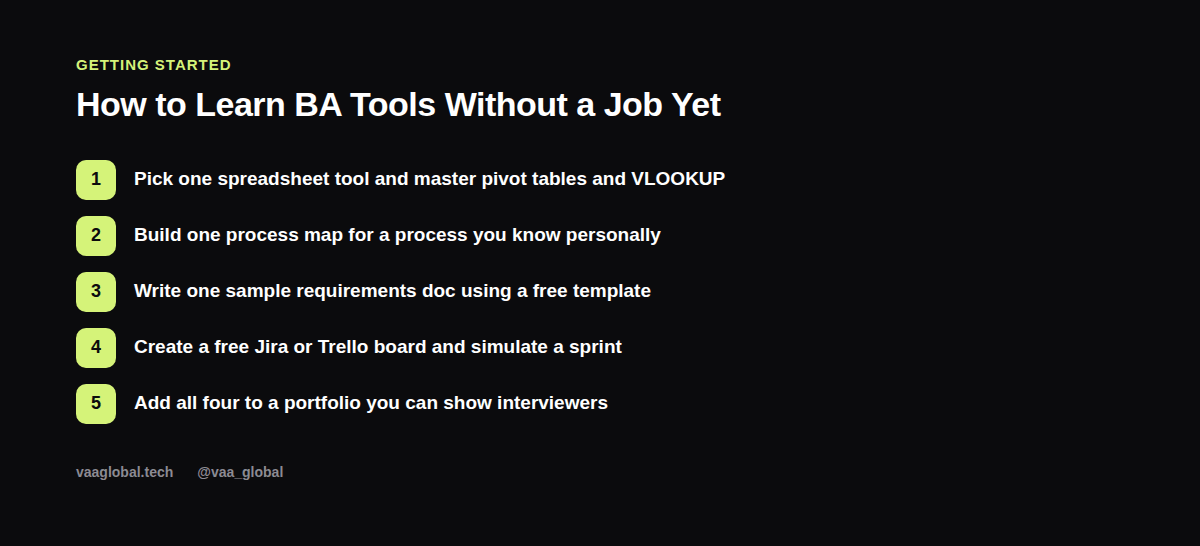
The honest truth is that you learn these tools fastest by using them on a self-directed project, not by watching tutorials passively. Pick one process you understand (a family business, a university club, a personal side hustle) and build a complete set of BA artifacts around it: a requirements doc, a process map, a sprint board, and a spreadsheet analysis. This mirrors the kind of hands-on work covered in our guide to business analyst portfolio projects for beginners, and it gives you something real to discuss in interviews. See our related piece on business analyst interview questions and answers for how to talk about these projects convincingly.
What Software Do Business Analysts Use Daily, Realistically?
In practice, what software do business analysts use daily is a shorter list than job postings suggest. For example, a typical day might involve a spreadsheet for data checks in the morning, a quick update to a process map after a stakeholder call, and a few comments on a Jira ticket before lunch. Because of this, you don't need to master every tool category at once; instead, focus on building daily fluency in just two or three tools first. Additionally, most teams are happy to train you on their specific setup, since tool familiarity matters far less than your underlying analytical thinking. Therefore, treat the tool list as a guide for practice, not a wall you must fully climb before applying.
A Note on Free vs Paid Versions
Nearly every tool mentioned here has a free tier generous enough for practice and portfolio-building: Google Sheets is entirely free, draw.io is entirely free, Notion and Trello both have free tiers, and Jira offers a free tier for small teams. You do not need to spend money to build real competence before applying for jobs.
The Bottom Line
The best tools for business analysts as a beginner are not exotic — a spreadsheet, a diagramming tool, a documentation tool, and a backlog tracker cover almost everything you'll need in your first role. Learn one tool per category deeply rather than skimming five superficially, and build a small portfolio project using all of them together. The official Excel documentation is a good place to brush up on functions if spreadsheets feel shaky. If you want a structured path that builds these skills alongside real BA methodology, our 10-week Business Analysis course covers requirements elicitation, requirements modelling, process improvement, data analysis for BAs, solution evaluation, and agile business analysis from day one.