An ATS-friendly resume formatting checklist exists for one reason: most companies now run resumes through an applicant tracking system resume scan before a human ever opens the file. If your layout confuses that software, a qualified resume can get rejected automatically, and you'll never know why. Getting the formatting right isn't about tricking anything, it's about removing friction between your resume and the software reading it first.
What An ATS Actually Does With Your Resume
An applicant tracking system doesn't read your resume the way a person does. It parses the file into text fields, tries to map that text onto categories like work history, education, and skills, and then ranks or filters candidates based on keyword matches and structure. When it can't parse something, like a graphic or a text box, that content is often skipped entirely or dumped in the wrong field, even if it was the most important line on the page.
What Formatting Does An ATS Not Like
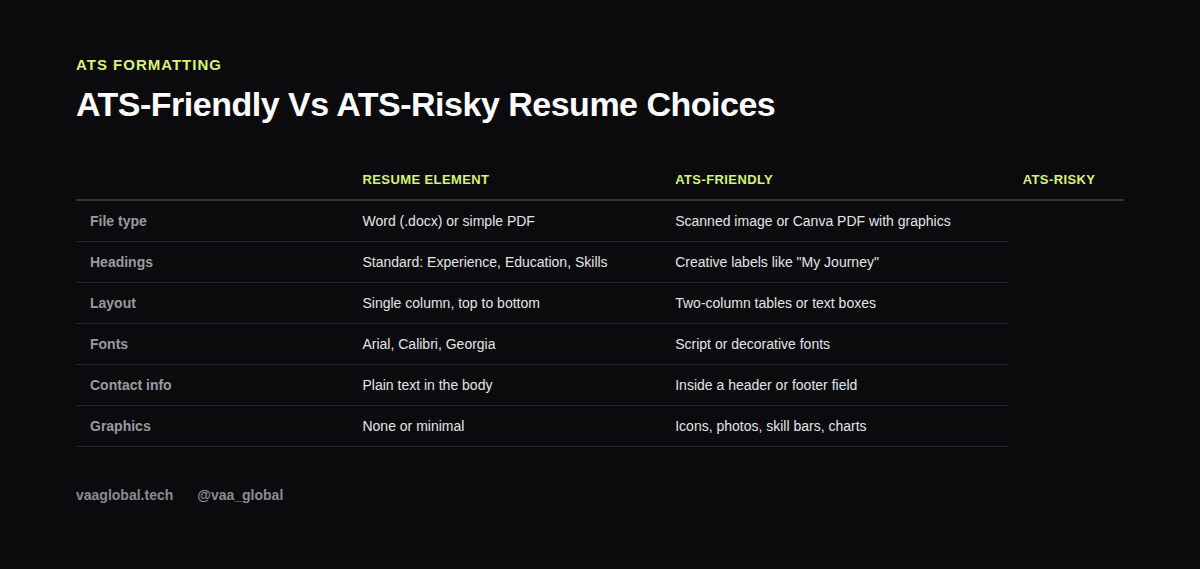
What formatting does an ATS not like is the most practical question to start with. Multi-column layouts, tables, text boxes, headers and footers, images, icons, and heavily designed templates (the kind you'll find in a lot of free Canva resume templates) are all common culprits. These elements might look polished to a human, but many parsing engines either scramble the reading order or drop the content altogether.
The 7-Step ATS-Friendly Resume Formatting Checklist
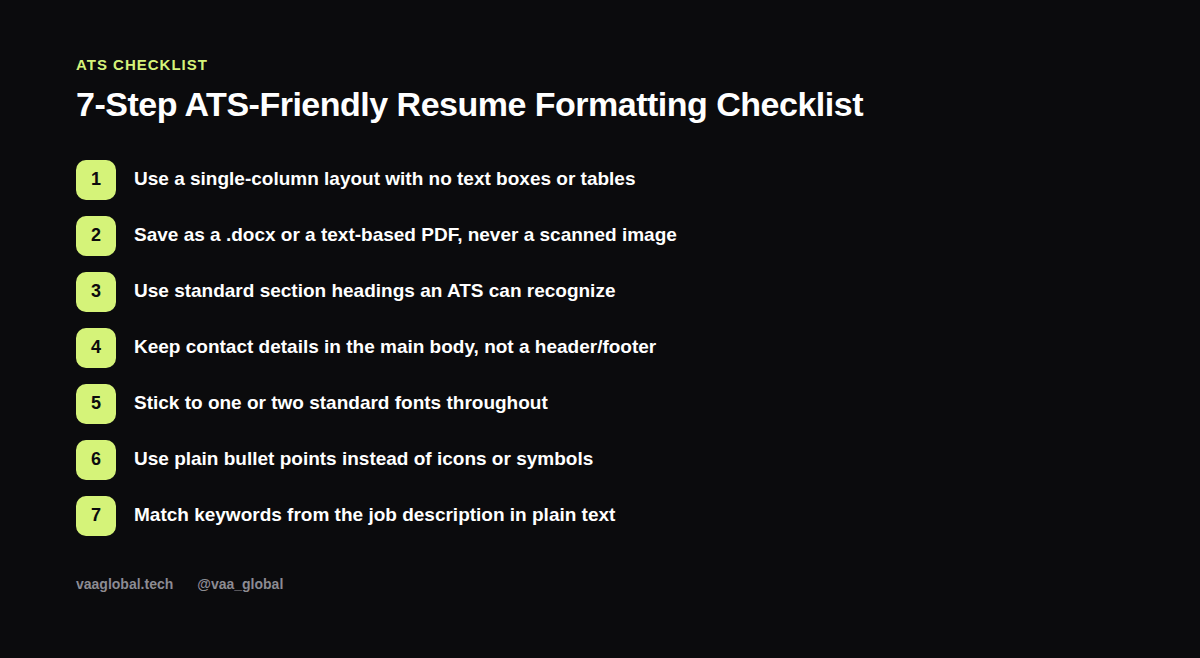
Run through this before you submit anything: use a single-column layout; save as .docx or a text-based PDF (never a scanned image); use standard headings like "Experience" and "Skills" instead of creative labels; keep your contact details in the main body rather than a header or footer field; stick to one or two standard fonts such as Arial, Calibri, or Georgia; use plain bullet points instead of icons; and mirror keywords from the job posting in ordinary text.
How Do I Know If My Resume Is ATS Friendly
How do I know if my resume is ATS friendly is easy to check yourself with a simple test: copy your entire resume text and paste it into a blank document. If the words come out in a readable, logical order with no missing chunks or scrambled sections, your file is probably parsing fine. If sentences are jumbled, cut off, or your contact info disappears, something in your layout is tripping up the resume parsing process.
Does My Resume Need To Be Plain To Pass An ATS
Does my resume need to be plain to pass an ATS is a fair worry, since plain can also mean boring. The good news is you don't have to sacrifice readability for compatibility. A clean, single-column resume with bold section headers, clear spacing, and consistent formatting can still look professional and intentional. Subtle use of bold and a single accent color is fine; the problem is graphics-heavy templates, not simplicity itself.
Building Your Own ATS Resume Template
If you'd rather build an ATS resume template from scratch than fight with a downloaded one, start with your name and contact info at the top in plain text, followed by a short resume summary, then Experience, Skills, and Education, in that order unless you have a strong reason to switch it. If you haven't written your summary yet, our guide on how to write a resume summary that gets read walks through that section specifically.
Keywords Still Matter More Than Design
Formatting gets your resume parsed correctly, but keywords are what get it ranked. Read the job description closely and use the same terms the employer used, whether that's a software name, a certification, or a specific responsibility, as long as it's true of your background. Avoid keyword stuffing; the goal is natural overlap, not a wall of repeated phrases. If you're building your resume with little or no paid work history, our post on quantifying achievements with no corporate experience pairs well with this checklist.
Common ATS Formatting Mistakes To Avoid
Beyond the checklist above, watch for a few smaller traps: abbreviations with no spelled-out version anywhere (write "Search Engine Optimization (SEO)" at least once), dates formatted inconsistently across jobs, and files named something generic like "resume_final_v3.pdf" instead of your actual name. None of these will tank a parse on their own, but together they create a messier read for whoever reviews the shortlist. It's also worth double-checking your document against our broader list of common resume mistakes remote job seekers make.
What Happens After You Pass The ATS
Passing the ATS only gets you to the next stage, a human reviewer, so the formatting choices that help a machine also need to hold up for a person skimming quickly. Once your resume is in good shape, line it up with a tailored cover letter using our notes on how to write a cover letter for a remote job, and get ready for the interview stage with how to prepare for a remote job interview. VAA Global students can also run a finished draft through the VAA Global CV and LinkedIn Review Tool before sending it out. For a more technical breakdown of how parsing software reads documents, LinkedIn's help center has additional guidance on profile and document compatibility.
The Bottom Line
An ATS-friendly resume formatting checklist isn't about outsmarting software, it's about removing the formatting choices that confuse it: no tables, no graphics, standard headings, plain fonts, and a file type the system can actually read. Get the structure right, match the job's keywords honestly, and your resume will reach a human reader instead of getting lost in a parsing error.