Once you start working remotely in healthcare, you'll want a clear sense of how medical virtual assistant telehealth platforms compared stack up against each other, because practices rarely use just one tool. Telehealth platforms vary quite a bit in design, but they all exist to connect a patient and a provider remotely while keeping the conversation private and, ideally, tied into the practice's existing workflow. Knowing the general categories helps far more than memorizing one brand's menu screens.
Why Telehealth Platforms Compared Side by Side Look So Different
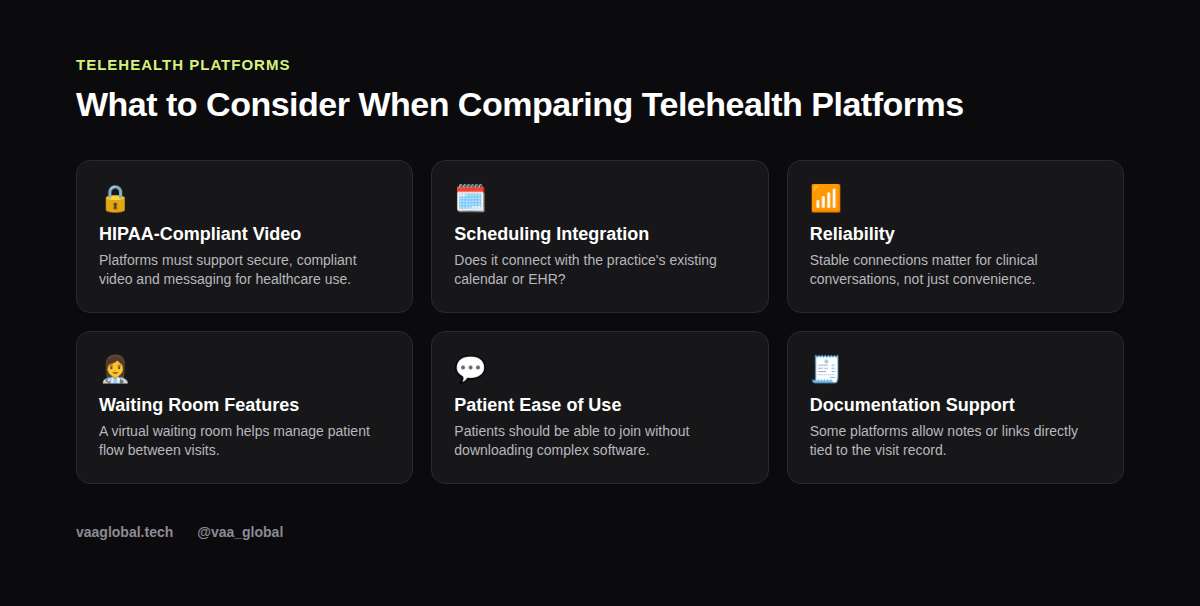
When you line a few telehealth platforms up side by side, the differences become obvious fast: some focus on simplicity for the patient, others on deep EHR integration, and others on general-purpose reliability borrowed from everyday business video calls. None of that makes one platform objectively better; it just means the right fit depends on the practice.
Why Telehealth Platforms Differ So Much
Not every practice needs the same thing from a telehealth tool. A busy multi-provider clinic might want video built directly into its EHR, while a solo therapist might prefer a simple, dedicated healthcare video tool. Because of that range, there's no single "best" platform, just different fits for different practice sizes and specialties.
General Video Conferencing Adapted for Healthcare
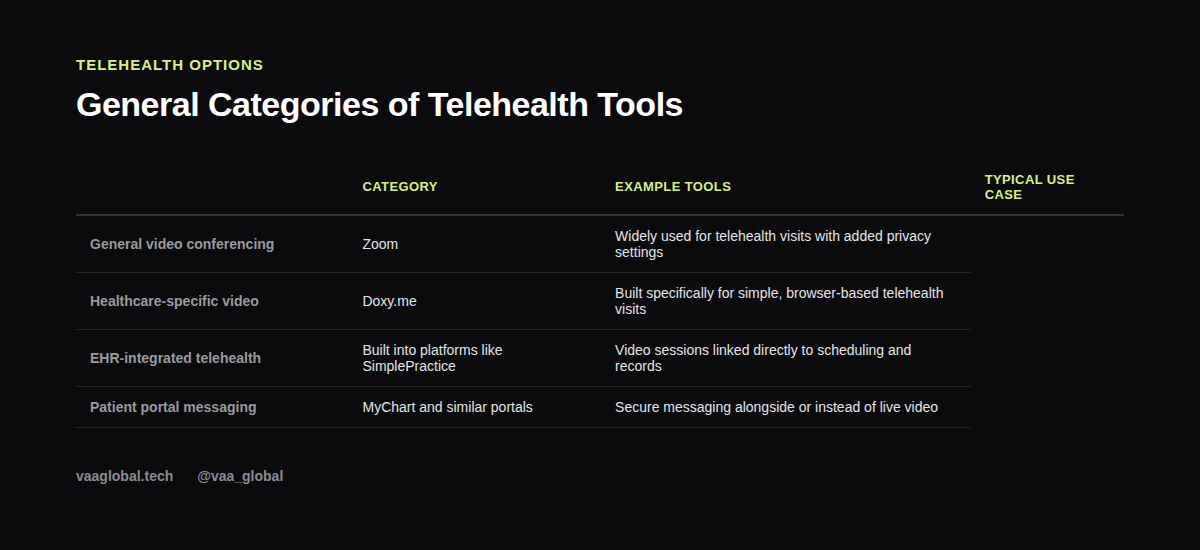
Tools like Zoom are widely used across many industries, and healthcare is no exception. Zoom offers settings geared toward privacy and security that some practices rely on for telehealth visits, especially smaller ones that don't want a dedicated healthcare-only tool. That said, a practice using general video conferencing software still needs to apply appropriate privacy settings and follow its own compliance policies.
Healthcare-Specific Video Tools
Other platforms, such as Doxy.me, were built specifically with healthcare visits in mind. These tools tend to emphasize simplicity for the patient, often requiring just a browser link with no account or app download. For an MVA, that usually means less troubleshooting when a patient calls in confused about how to join.
Telehealth Built Into an EHR
Some EHR and practice management systems, like SimplePractice, include their own telehealth features directly tied to scheduling and client records. This integration can simplify an assistant's job since the video session, the calendar entry, and the client file all live in one place. If you want a refresher on EHR basics generally, our guide on EHR vs EMR is a useful starting point.
What an MVA Actually Does Around Telehealth
Regardless of which platform a practice uses, an MVA's responsibilities tend to look similar: scheduling the visit, sending clear instructions, confirming the patient's contact details are current, and following up if a technical issue derails the appointment. For a deeper look at this specific skill area, see our article on telehealth support.
Privacy and Compliance Still Come First
Whichever telehealth platform a practice chooses, HIPAA still applies to the conversation happening over it. For a video visit to count as fully compliant, the vendor generally needs to sign a business associate agreement and apply reasonable security safeguards, and those two pieces generally make a telehealth platform HIPAA compliant in the first place. As an MVA, that means confirming the tool meets the practice's requirements, never recording sessions without authorization, and following the same data-handling habits you'd use for any other patient information, whether it lives in a chart or a patient portal. The official HIPAA overview at HHS.gov is worth bookmarking as a reference, and our piece on patient data protection covers the broader habits that apply here too.
Helping Patients Who Struggle With the Tech
A surprising amount of telehealth support work is really just patience. Older patients or those with limited internet access often need extra guidance to join a call successfully. Walking someone through a join link calmly, without rushing them, is one of the most genuinely useful things an MVA can offer in this part of the role. These day-to-day telehealth support tasks rarely show up in a job description, but they end up shaping how patients feel about the whole virtual care experience.
Why Virtual Care Keeps Growing
Virtual care has become a normal part of how many clinics operate, not a temporary workaround. Patients increasingly expect at least the option of a video or phone visit, especially for follow-ups that don't require a physical exam. Consequently, comfort supporting telehealth visits is turning into a baseline skill for remote healthcare roles rather than a specialty one.
How to Talk About This in Interviews
If you're asked how telehealth platforms compare, focus on the categories rather than claiming deep expertise in any one brand's specific features. Saying something like, "I understand the general differences between EHR-integrated video, healthcare-specific tools, and general conferencing software, and I'm comfortable guiding patients through whichever one a practice uses," shows genuine understanding without overstating your experience.
The Bottom Line
When you compare medical virtual assistant telehealth platforms, the specific brand matters far less than understanding the general categories, the compliance basics, and the human side of helping a patient connect successfully. Build that foundation, and you'll adapt quickly no matter which tool a future employer happens to use. VAA Global's Medical Virtual Assistant Training is a 6-module, beginner-level course covering telehealth support, HIPAA compliance, and EHR basics, with no prior medical background required, plus job assistance after graduation.