If you're exploring remote healthcare admin work, you've likely come across medical virtual assistant SimplePractice basics while browsing job listings for therapy and wellness practices. SimplePractice is a popular practice management and EHR platform built specifically for therapists, counselors, and other behavioral health providers. Knowing what it does and where an assistant fits in can make the difference between a confident interview and a confused one.
What Is SimplePractice Used For?
So, what is SimplePractice used for in a typical practice? Mostly scheduling sessions, storing client records, sending invoices, and allowing secure messaging between clients and their provider. Because it was designed with solo practitioners and small group practices in mind, the interface tends to feel more approachable than larger hospital-grade systems, which is good news if you're new to healthcare software. In addition, many providers use it to track treatment plans and session notes in one connected system, instead of juggling separate spreadsheets and paper files.
Do Medical Virtual Assistants Use SimplePractice?
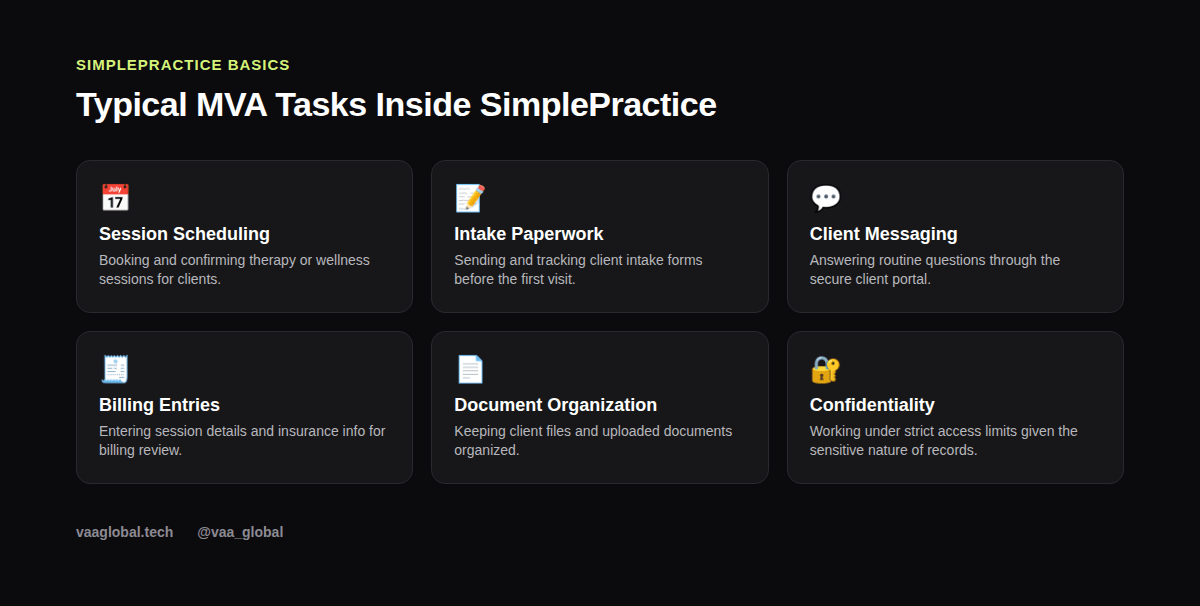
Yes, often. Many therapy and wellness practices hire remote assistants specifically to manage the administrative load inside SimplePractice. As a result, you might spend your day confirming appointments, following up on unsigned intake paperwork, or answering general scheduling questions through the client portal, all without ever touching a client's actual therapy notes.
Where the MVA Role Begins and Ends
Because SimplePractice holds sensitive mental health information, practices are usually strict about access levels. An assistant typically gets permission to view scheduling and billing details, but not full clinical notes. This boundary matters more here than in some other specialties, since mental health records carry extra sensitivity beyond standard medical privacy rules.
How SimplePractice Compares to Other Platforms
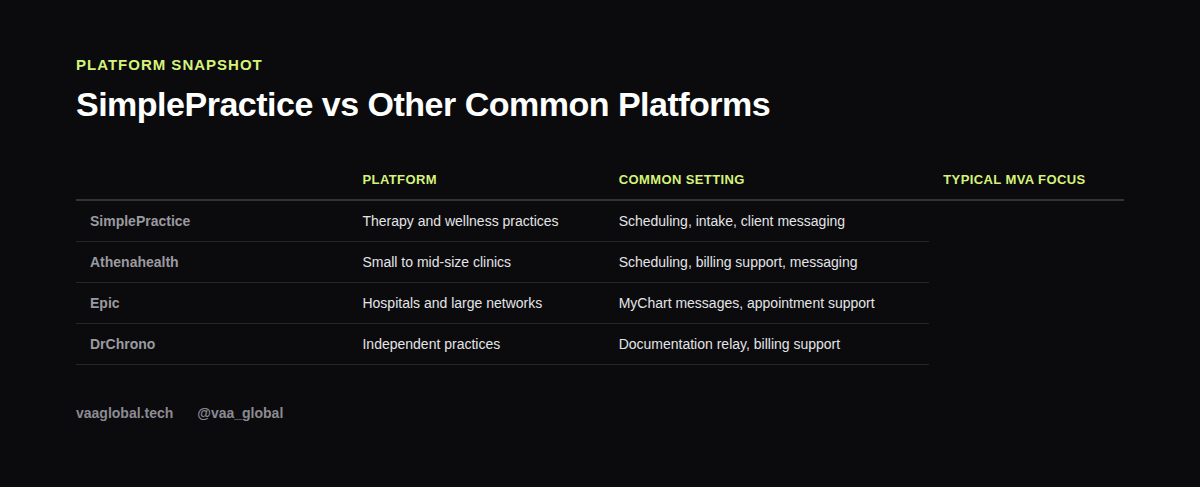
SimplePractice isn't the only system out there, and it helps to understand how it fits alongside others. For a broader comparison across platforms, see our guide on medical virtual assistant tools and software comparison, which looks at SimplePractice alongside Athenahealth, Epic, and DrChrono.
Scheduling: The Core of the Job
Scheduling sits at the center of most SimplePractice-related MVA roles. You'll likely manage recurring session slots, handle cancellations, and send reminder messages. For more on this skill area generally, our article on appointment scheduling covers the fundamentals that apply across almost any platform, SimplePractice included.
Billing Entries Without Full Billing Authority
SimplePractice also handles invoicing and insurance claim submission. An MVA might enter session details or insurance information, but final billing decisions and claim disputes usually stay with the provider or a dedicated biller. Still, accuracy matters a lot here, because a small typo in an insurance ID can delay payment by weeks. Our overview of medical billing tasks explains where that line typically sits, and it applies whether a practice runs on SimplePractice or something else entirely.
Confidentiality Matters Even More Here
Because therapy records are especially sensitive, HIPAA compliance is non-negotiable in this niche. Never discuss client details outside approved channels, and always follow the specific access rules your practice sets. For the authoritative source on HIPAA requirements, see HHS.gov rather than relying on secondhand summaries.
Telehealth Scheduling Inside SimplePractice
Many therapy and wellness practices now offer telehealth sessions alongside in-person visits, and SimplePractice supports that shift with built-in video session scheduling. For an MVA, this usually means managing a mixed calendar of in-person and telehealth appointments, sending the right session link or instructions ahead of time, and confirming clients know what to expect before they log in. If telehealth scheduling tools are new to you, our broader piece on telehealth support is a good next read, since the same communication habits carry over from one platform to another.
Why This Niche Attracts Remote Workers
Therapy and wellness practices are increasingly comfortable hiring fully remote administrative help, partly because so much of the work, scheduling, messaging, and billing entry, already happens on a screen. That makes SimplePractice-focused roles a reasonable entry point for someone building a remote healthcare career from Nigeria or anywhere else outside the practice's home country.
A Realistic Day-to-Day Picture
On a typical day, an MVA supporting a SimplePractice therapy office might start by checking overnight messages from clients, confirming the next day's sessions, and following up with anyone who hasn't completed their intake paperwork. Later, there might be a short block for entering insurance details on recently completed sessions. None of this requires clinical training; instead, it requires organization, clear communication, and respect for the sensitivity of what you're handling.
Is SimplePractice Hard to Learn for Beginners?
Generally, no. Most people who already understand basic scheduling and client communication pick up SimplePractice within a short onboarding period. The platform was built for providers who aren't tech specialists themselves, so the learning curve tends to be gentler than hospital-grade EHRs like Epic.
The Bottom Line
Medical virtual assistant SimplePractice basics really come down to understanding scheduling, intake, and messaging workflows while respecting strict confidentiality boundaries around sensitive mental health records. You don't need direct SimplePractice experience to get started; you need transferable EHR and administrative skills. VAA Global's Medical Virtual Assistant Training is a 6-module, beginner-level course covering EHR concepts, HIPAA compliance, and medical billing basics, with no prior medical background required, plus job assistance after graduation.