Patient portals have quietly become one of the busiest parts of a modern medical practice, and that's exactly why medical virtual assistant patient portal management is such a common responsibility for remote healthcare roles. A patient portal is simply the secure website or app where patients message their provider, request appointments, and view parts of their own record. Managing it well is less about technical skill and more about judgment, organization, and knowing exactly where your responsibility ends.
What Does a Patient Portal Manager Actually Do?
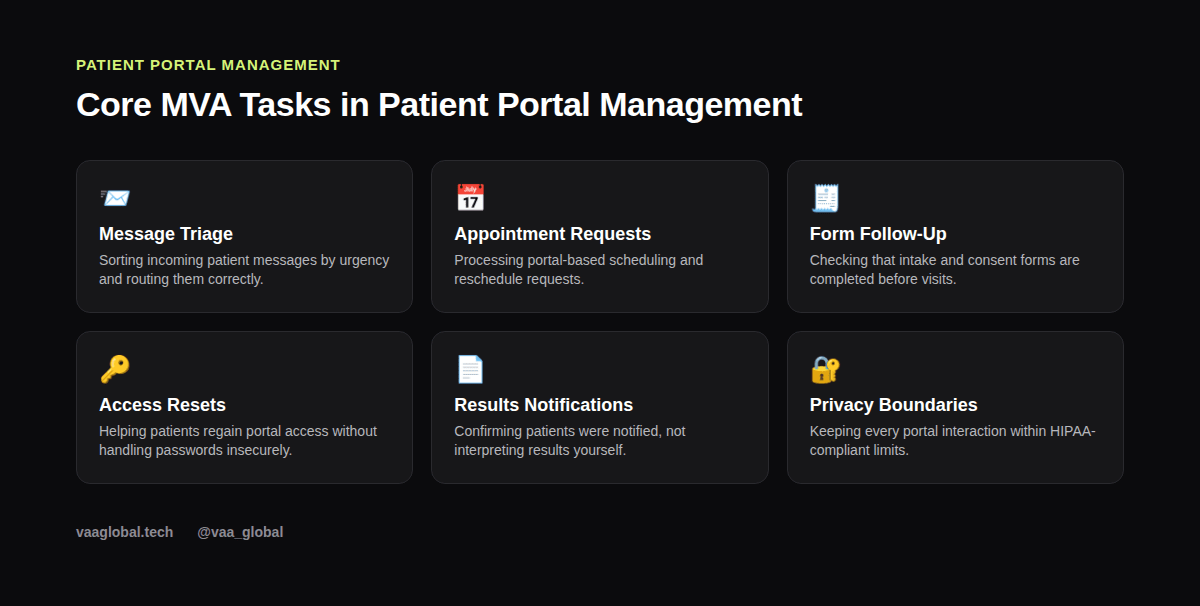
So, what does a patient portal manager do on a normal day? Mostly, they work through a queue of messages, requests, and forms, deciding quickly what needs immediate attention and what can wait. It's a mix of customer service instincts and administrative follow-through, applied to a healthcare setting instead of a general business one.
What a Patient Portal Actually Does
Most patient portals connect directly to the practice's EHR, so a message sent through the portal often lands in the same inbox staff use for other administrative work. Patients typically use it to request appointments, ask billing questions, request refills, and sometimes view lab results once a provider releases them.
How Do You Triage Patient Portal Messages?
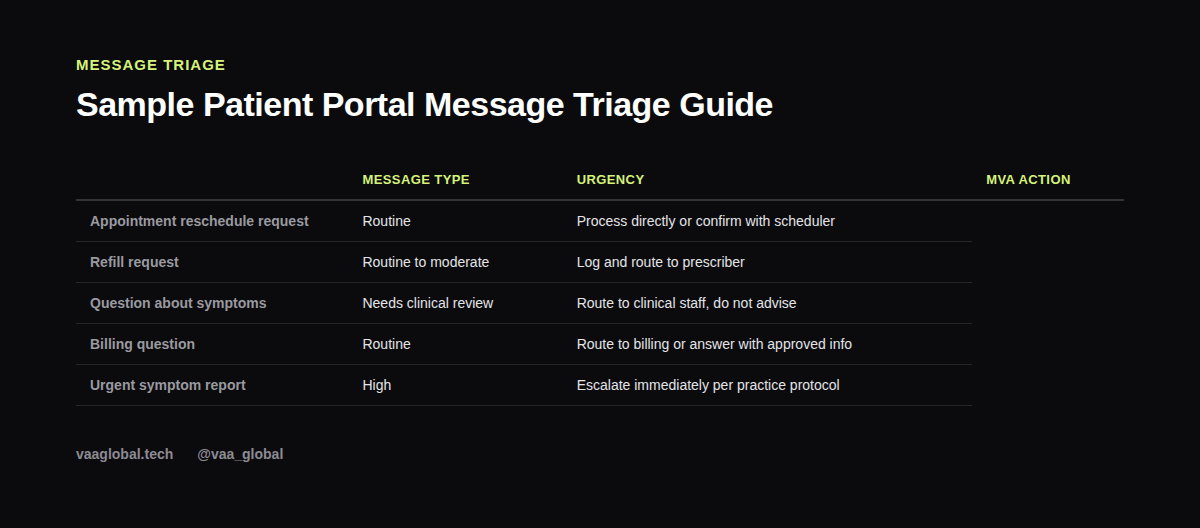
Because portal messages arrive constantly and vary wildly in urgency, triage becomes the most important skill an MVA brings to this role. So, how do you triage patient portal messages in practice? Generally, you sort them into a few buckets: routine scheduling, billing, and anything that sounds clinical. A rescheduling request can usually be handled directly, while a message describing new or worsening symptoms needs to go straight to clinical staff rather than sitting in a queue. Getting this sorting right, consistently, is what separates a reliable portal manager from a risky one.
Handling Appointment Requests
A large share of portal traffic is simple scheduling: new appointment requests, reschedules, and cancellations. This overlaps heavily with general scheduling skills, so our guide on appointment scheduling is worth reviewing alongside this one, since the two tasks often happen side by side.
Following Up on Incomplete Forms
Patients frequently start an intake or consent form through the portal and never finish it. Following up with a friendly reminder, rather than letting the form sit unfinished until the appointment, keeps the visit running smoothly and reduces last-minute delays for the provider.
Can an MVA Answer Medical Questions in a Portal?
It's tempting to answer a quick medical question yourself, especially once you're comfortable with the portal and the practice's general patterns. However, can an MVA answer medical questions sent through a portal? No, not even a simple-sounding one. Clinical questions, including anything about symptoms, medications, or test results, need to go to licensed staff instead. Our piece on medical coding boundaries covers a related example of where administrative work stops and clinical judgment begins.
How Do You Reset Patient Portal Access?
Password resets and access issues come up often, and they need careful handling. So, how do you reset patient portal access without creating a security risk? Generally, by following a verified identity check first, then using the practice's approved reset tool rather than emailing a password directly. Never share login credentials over an unsecured channel, and always follow your practice's exact verification process before granting or restoring access. Our article on patient data protection covers these habits in more depth, and the official HIPAA guidance at HHS.gov is the authoritative source for the rules behind them.
Portal Software Varies, the Habits Don't
Different practices run different patient portal software, whether it's built into a larger EHR or a standalone tool. Even so, the underlying habits transfer across all of them: sort by urgency, respect the clinical boundary, and follow up until a task is actually closed out, not just acknowledged.
Why This Role Fits Remote Work So Well
Patient portal management happens almost entirely online already, which makes it a natural fit for a remote assistant. You don't need to be physically present to triage a message, confirm an appointment, or follow up on a form, which is part of why this task shows up constantly in remote MVA job listings.
How to Describe This Skill in Interviews
If you haven't managed a patient portal before, focus on transferable skills: experience triaging emails or messages by urgency, following clear escalation rules, and respecting confidentiality. Those habits translate directly, even if the specific software is new to you.
The Bottom Line
Medical virtual assistant patient portal management is really about disciplined triage, clear boundaries, and consistent follow-up, not technical mastery of any one platform. Get comfortable with those habits, and the specific portal software will make sense quickly once you're on the job. VAA Global's Medical Virtual Assistant Training is a 6-module, beginner-level course covering HIPAA compliance, EHR basics, and healthcare administration, with no prior medical background required, plus job assistance after graduation.