If you've been scanning remote healthcare job boards, you've probably noticed that medical virtual assistant Athenahealth basics show up in a lot of listings. Athenahealth is a popular cloud-based EHR and practice management platform used by many small to mid-size clinics across the United States. Understanding what it does, where an assistant typically works inside it, and what you don't need to already know will help you walk into interviews with confidence instead of guesswork.
What Athenahealth Actually Is
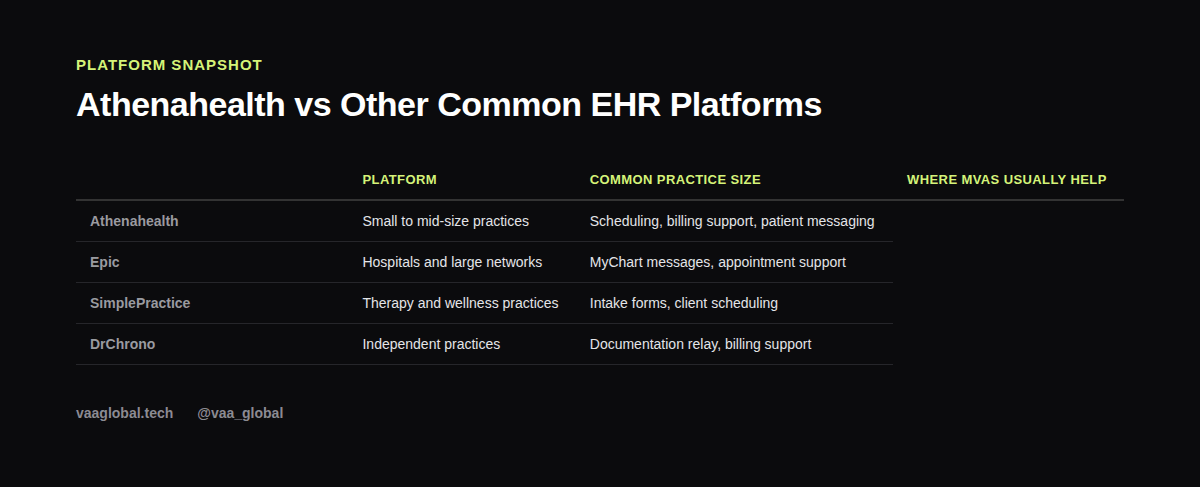
Athenahealth combines an EHR, a practice management tool, and billing software into one cloud platform. Because it runs in the browser rather than on local hospital servers, smaller practices often prefer it over heavier systems. Clinics use it to document visits, track patient history, and submit insurance claims, all from one connected dashboard.
So, What Is Athenahealth Used For?
In short, clinics use Athenahealth to run the business and clinical side of patient care together: booking visits, documenting them, and billing for them. Naturally, this raises a follow-up question: do medical virtual assistants use Athenahealth directly? Often, yes. Many remote assistant roles log into Athenahealth every day to manage calendars and messages, although always with limited, role-specific access rather than full provider-level permissions.
Where an MVA Typically Works Inside It
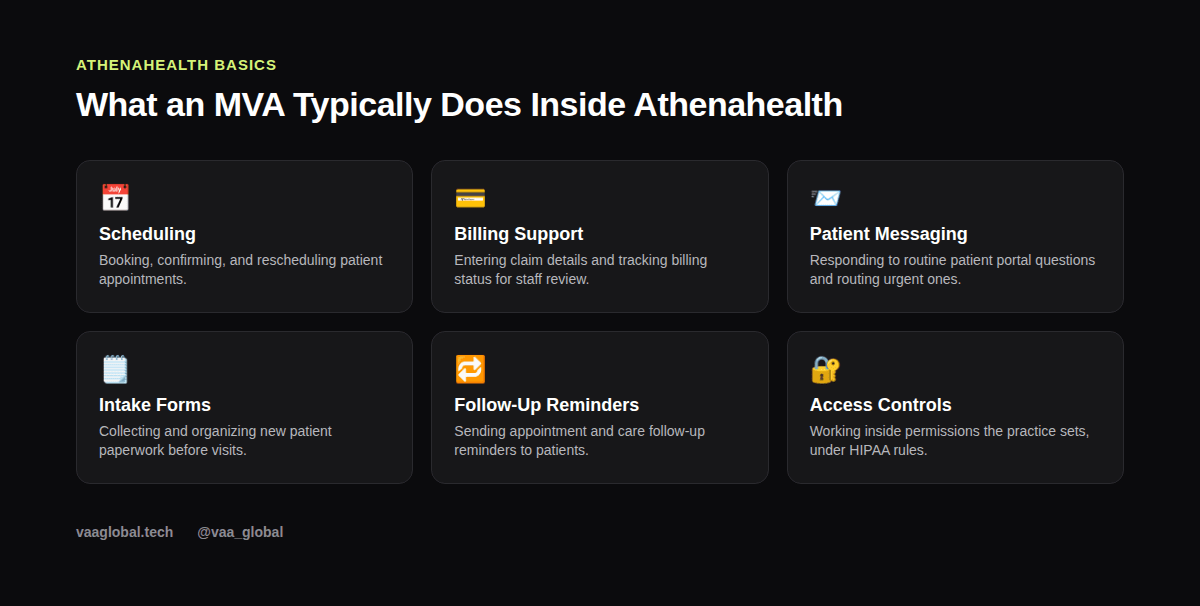
Most remote assistants working with Athenahealth focus on the administrative side rather than clinical charting. That usually means managing the appointment calendar, confirming visits, updating patient contact details, and handling routine messages through the patient portal. Some roles also involve basic billing support, such as entering claim information for a biller or provider to review before submission.
How Athenahealth Compares to Other Platforms
Every EHR platform organizes information a little differently, but the core ideas stay the same across all of them. For a closer side-by-side comparison, our article on medical virtual assistant tools and software comparison walks through several systems clinics commonly use, including Athenahealth, Epic, SimplePractice, and DrChrono.
Scheduling and Patient Communication
A big part of daily MVA work inside Athenahealth revolves around scheduling. You might book new appointments, send reminder messages, or reschedule visits when a patient calls in. If you want a deeper look at how scheduling fits into the bigger picture, see our guide on appointment scheduling for medical virtual assistants.
Billing Support Without Becoming a Biller
Athenahealth's billing tools connect directly to its scheduling and charting modules, so clean data entry upfront makes claims move faster later. As an MVA, you're not expected to code diagnoses or appeal denied claims. Instead, you support the billing workflow by keeping information accurate and flagging anything unusual to the right staff member. Our piece on medical billing tasks covers this boundary in more detail.
How Does Athenahealth Billing Work, Exactly?
At a basic level, how does Athenahealth billing work? A visit gets documented, codes get attached to that visit, and a claim gets generated and sent to the patient's insurer. Therefore, the data an MVA enters early in that chain, like insurance details or visit reasons, directly affects whether the claim goes through cleanly later. Getting comfortable with this flow, even without touching the coding itself, makes you far more useful on day one.
Why Employers List It as a Requirement
When a job post mentions Athenahealth specifically, it's often because the clinic wants to skip extended onboarding. That said, most reasonable employers still train new hires on their exact workflow, since every practice configures the system a bit differently. Strong general EHR knowledge and HIPAA awareness usually matter more than prior Athenahealth hours.
Keeping Patient Data Secure
Like any EHR, Athenahealth holds protected health information, so every login, message, and edit falls under HIPAA. Keep your own credentials private, avoid screenshotting patient data, and follow your employer's access rules exactly. The official HHS guidance on HIPAA rules at HHS.gov is a solid reference if you want the authoritative version rather than a summary.
Is Athenahealth Hard to Learn as a Beginner?
Not particularly, as long as you already understand general scheduling and charting concepts. Most people get comfortable with the parts they actually use, like the calendar and messaging inbox, within their first couple of weeks. So if you're asking whether Athenahealth is hard to learn for a new MVA, the honest answer is that the learning curve is manageable with decent training and a little patience.
Getting Ready Before You're Hired
You can't get free personal access to Athenahealth before landing a job, but you can prepare in other ways. Learn what Athenahealth is used for in general terms, study medical scheduling and billing vocabulary, and get comfortable with the idea of structured digital patient records. That foundation makes any specific platform, including Athenahealth, far easier to pick up on the job.
The Bottom Line
Medical virtual assistant Athenahealth basics come down to understanding what the platform manages, where your role as an assistant begins and ends, and how to talk about it honestly in interviews. You don't need hands-on Athenahealth experience to start; you need the underlying EHR and administrative skills that transfer to it. VAA Global's Medical Virtual Assistant Training is a 6-module, beginner-level course covering EHR concepts, HIPAA compliance, and medical billing basics, with no prior medical background required, plus job assistance after graduation.